If you use the Starter package and your website no longer works after the mentioned date, you can find additional information and solutions HERE
How to close (temporarily) WWW access to website
Some customers have asked for recommendations on how to temporarily restrict access to their website. There are several solutions for this:
1. Restrict access to the entire web directory with a password
2. Block WWW access to the entire web directory
1. Restrict access to the entire web directory with a password
1. Log in to your cPanel control panel (guide available HERE)
2. In cPanel, go to Files -> Directory Privacy
3. In the directory tree, find the appropriate folder by clicking the folder icons and, once you have found the correct folder, click EDIT on the same row as the folder name
4. Tick the checkbox “Password protect this directory.”, enter a name for the password protection, and save
5. Add the desired usernames and save
Now access to the directory from the web is protected with credentials.
2. Block WWW access to the entire web directory
This can be done via .htaccess by restricting all traffic to the directory where the .htaccess file is located.
To do this:
1. In cPanel, go to Files -> File Manager
2. In the directory tree, navigate to the appropriate folder and edit the existing .htaccess file, or add a new .htaccess file and insert the suitable code from the examples below on the first line, i.e., at the very top of the file.
Simple restriction:
Require all denied
Deny from all
Simple restriction with a maintenance message:
Require all denied
Deny from all
ErrorDocument 403 "Website under maintenance"
Closed page restriction with a more specific bilingual message:
AddDefaultCharset UTF-8
Require all denied
Deny from all
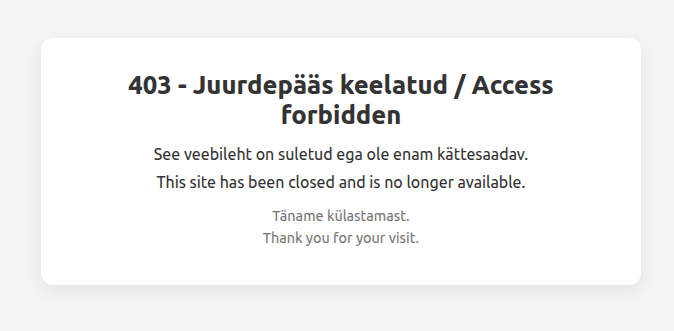
ErrorDocument 403 "<!DOCTYPE html><html lang='et'><head><meta charset='utf-8'><title>403 - Juurdepääs keelatud / Access forbidden</title><style>html,body{height:100%;margin:0;font-family:system-ui,-apple-system,BlinkMacSystemFont,'Segoe UI',sans-serif;background:#f5f5f5;color:#333;}body{display:flex;align-items:center;justify-content:center;text-align:center;} .box{max-width:520px;background:#fff;padding:2rem 2.5rem;border-radius:12px;box-shadow:0 6px 18px rgba(0,0,0,0.08);} h1{font-size:1.6rem;margin:0 0 .75rem;} p{margin:.25rem 0;line-height:1.5;font-size:1rem;} .muted{color:#777;font-size:.9rem;margin-top:.75rem;}</style></head><body><div class='box'><h1>403 - Juurdepääs keelatud / Access forbidden</h1><p>See veebileht on suletud ega ole enam kättesaadav.</p><p>This site has been closed and is no longer available.</p><p class='muted'>Täname külastamast.<br>Thank you for your visit.</p></div></body></html>"
Closed page restriction with a more specific multilingual message:
AddDefaultCharset UTF-8
Require all denied
Deny from all
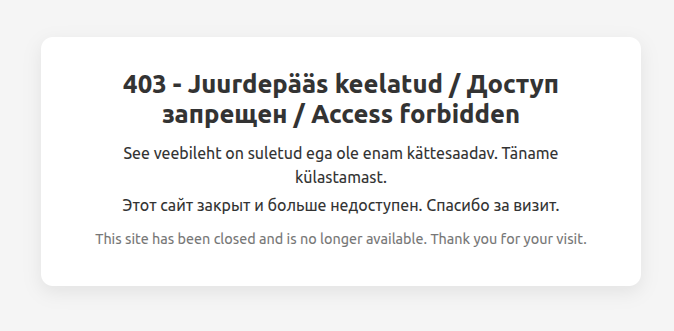
ErrorDocument 403 "<!DOCTYPE html><html lang='et'><head><meta charset='utf-8'><title>403 - Juurdepääs keelatud / Доступ запрещен / Access forbidden</title><style>html,body{height:100%;margin:0;font-family:system-ui,-apple-system,BlinkMacSystemFont,'Segoe UI',sans-serif;background:#f5f5f5;color:#333;}body{display:flex;align-items:center;justify-content:center;text-align:center;} .box{max-width:520px;background:#fff;padding:2rem 2.5rem;border-radius:12px;box-shadow:0 6px 18px rgba(0,0,0,0.08);} h1{font-size:1.6rem;margin:0 0 .75rem;} p{margin:.25rem 0;line-height:1.5;font-size:1rem;} .muted{color:#777;font-size:.9rem;margin-top:.75rem;}</style></head><body><div class='box'><h1>403 - Juurdepääs keelatud / Доступ запрещен / Access forbidden</h1><p>See veebileht on suletud ega ole enam kättesaadav. Täname külastamas&116;.</p><p>Этот сайт закрыт и больше недоступен. Спасибо за визит.</p><p class='muted'>This site has been closed and is no longer available. Thank you for your visit.</p></div></body></html>"